Posts

102CR Portfolio

Image
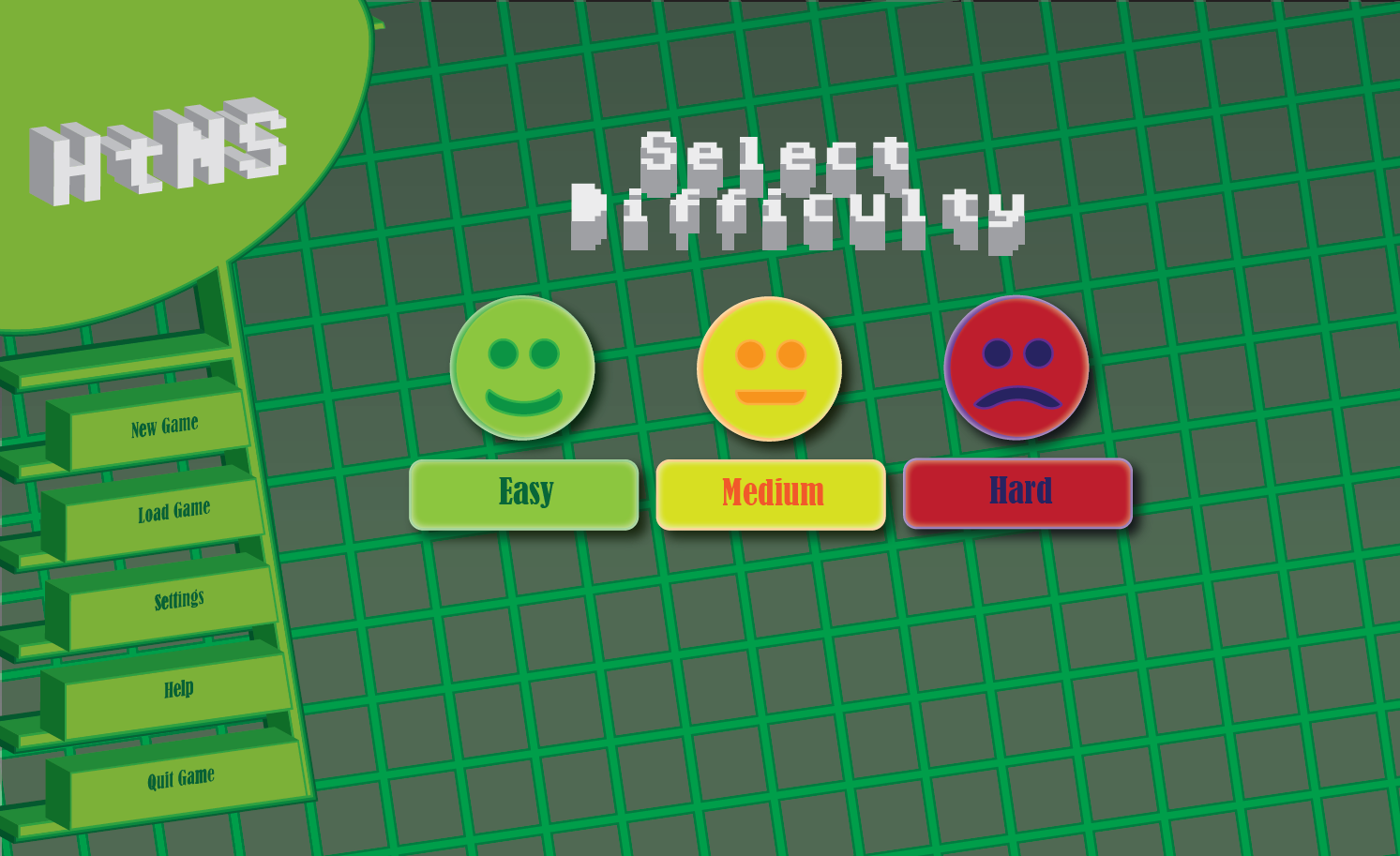
102CR: Portfolio: UI Design: For this task I had to come up with a menu GUI for the ALL project I was developing. The interactive storyline was set in cyberspace, so I tried to give my piece a digital feel. Since the game had a very minimalist style, I tried to do the same with my menu. Final Piece: I started off by doing a very rough sketch of the idea I wanted to do. I used this simple sketch as the basis. I used a grid to help get exact line placement. The buttons were drawn flat first. I combined the font to be used onto the shapes. I used the 3D effect function on the menu, which made it more visually interesting, and helped match the visual style of the interactive story. I had to manually move every part of the menu to make it line up, as the 3D doesn’t work on the grid. A deliberately retro looking font, Adore64, was chosen for the title and the on screen text. This font was hard to read on the buttons once they were rendered in 3D, so a different font was c...

Reflection on the VR Story

We aimed big, and was not able to deliver anywhere near the project we were hoping. I feel this came down to several elements: Not everyone on the team was equally motivated, and thanks to communication issues tasks were often not assigned in good time frame. Often I would ask to receive a task, and simply not be given one. We were also missing one team member, a person who did not perform any tasks assigned to him, and he communicated so little with us, not even in labs, or on Discord, that I am honestly not sure who he is. Our constant battles with trying to use Git Hub and having to use a very weird workaround for Unity Collab served as a motivation drain, particularity with how long it took for things to start being combined into a single work file, and I feel several team members, who were initially excited for the project, fell on the wayside. The biggest problem with the project was the VR element itself. As a team, we could barely get it to work. Often, things that were prev...

My room in the final project.

Image
Importing my room model and the doodad model into the final project, (the room was accidentally imported too big), and I replaced the static pillars in the original model with my animated doodad. In order to bring the doodad to life further, code was added to manipulate the light source object, a simple sine math function gave a gradual curve as it was shot up and out of the original object. With the floats being public, each light object could have a slightly different movement pattern, added in the editor. The object was given its own light source, and as it travelled down the body of the doodad, lit up each segment as it bypassed them, an effect I consider very effective. A modified version of my Map Puzzle was included to use a 3D Model produced by the artist on the team. Since the location of the terrorist was accidentally left visible, this made the puzzle even easier than it already was, but the basic code I did still worked even on the sphere, since I produced a ...

3D Animated Doodad

Image
Since a lot of the objects in the game were static, I decided to make a piece of decoration to be placed where-ever needed to help spice up the game world. This decoration was to incorporate a simple animation that rotated the top of the object continually and in a perfect circle. By default, whilst using the Euler XYZ controller an element cannot be rotated fully in 3DS Max, as the angles top out at -180°, and 180°. This causes the element to rotate back on itself as the angle overflows. To get around this, we need to use the TCB rotation controller setting in the animation options, which allows up to use angles up to 360° easily and efficiently. With this I am able to keyframe at 25 frame intervals, and the animation gets a perfectly smooth loop. A plan for this object is for the upper object to be a light source. We might further enhance this animation through code. It's a simple animation, but combined with the light source should be effective in the interactive s...

Main Project Usability Testing

For the main project, me and Alistair were tasked to come up with the usability test that we could run for the main game, with the idea of Marco and Luis being the ones to run the test themselves. Both myself and Alistair came up with very different things to test for, and what should be told to the user, and our documents were merged into a single form to be given out to users testing the main game, as well as usability instructions for those running the tests. The form and instructions can be seen at the link below: Link to Document Unfortunately due to Luis suffering from constant issues with the main game project and the VR, these usability tests were never carried out to my knowledge.

Second Puzzle Usability Test 2

Image
I ran a second usability test. Having taking into account what I had learned from the first one. The play arena was walled off, and while I did not implement the on screen prompts in this session, the controls were explained to the user before the test began. After a bit of confusion from me accidentally leaving in the globe object, both puzzles were solved relatively quickly, and the most marked improvement was in the speed the second puzzle got solved. For a VR Story game, this puzzle would be fairly easy for the player to figure out and still present a minor obstacle that wasn't a roadblock, and still give a feeling to the player of manipulating data.

Revitalizing the second puzzle.

Image
Following it's failure in the usability test, the second puzzle was reworked from the ground up. For a start, the cubes that were to be moved around were made into a prefab, so they could be recreated in the game world easier. I also made the current texture of the cube change based on what variable the number of the box was set to, rather than assigning the textures manually. The textures it could choose from were themselves stored in a list, and modified in the Unity editor. This means in theory I could replace the numbers with just about anything (such as shapes) and could have a similar puzzle with a very different context. I decided the optimum way of making the puzzle was to have a simple check against a value in a list, and to see whether or not it matched the current box number of the cube. To make the puzzle easier to edit and rearrange, the list that the current layout of cubes was to check against was sorted at the beginning of the game with Quicksort, a divide ...

3d Modeling a Room

Image
One of the tasks Marco gave out to everyone was for everyone to model one of the rooms in the interactive story. We did this in 3DS Max. The art style chosen for the game by the artist involved a lot of hexagons in the designs, so I built my room with these decorating the wall, floor, and having many of the objects in the room use hexagons in their designs. Since it is not one of the basic shapes in 3DSMax, to create a hexagon model in 3DSMax I first create an NGon spline set to six sides and apply the extrude modifier to thicken the shape. I can then convert this shape into a editable poly and modify it further if need be. For example, for the details on the floor, I used the chamfer function on the model’s edges to create more rounded edge. I also built entrances into the room in the shape of a hexagon. I knew we’d be implement portals to transfer between rooms without corridors, so I could just create the entrance itself. I used the proboolean function and subtract...

Recording the story Dialogue

Image
One of the tasks I was assigned was to be the voice for the mysterious benefactor, since I was one of the few of our group with a English accent, and as creative director, had a clearer image in my head of what I wanted our villain of the story to sound like. These were recorded using Adobe Audition and then edited for clarity in the same software by removing any background noise. Since my natural voice isn't exactly the most mysterious and imposing, and my acting skills are limited, I used the software to try and enhance the voice over. I also removed any background noise for a clearer voice over. I pitched shifted my voice, which gave it a far more sinister quality, and was exactly what the team was looking for. Based off my final script, all the dialogue my side was recorded. The one thing the team vetoed was an additional effect applied to the voice over which gave it a radio static effect, the team wanted clearer dialogue, arguing that in cyberspace there shouldn't...

Final Story Draft

Using online software called inklewriter, I made a interactive version of the story for the team to follow and trial. Whilst ambitious, the team liked it, and inspired one or two of them to try and implement what we can in the final project. The storyline can be played through via the link below. http://writer.inklestudios.com/stories/rcrr

Usability Test

Image
For the first usability test, I tasked the user to perform two actions: Complete both puzzles. Since I had left the test map wide open, one of the things the user did was to wonder about looking for things to do. When they actually approached the puzzle, the first one was solved immediately by them happening to look in the correct place straight away. After wandering around the empty world map for a period of time the user then approached the number puzzle, and their first instinct was to remove all the cubes, once they were told how Marco’s “gravity gun” worked, (By holding the mouse button down the user holds onto objects. Without on-screen prompts this is not obvious.) The user then proceeded to put the cubes in backwards, which revealed the flaw behind the original algorithm used for the puzzle - the wrong cube would light up correct as it found the number somewhere in the sequence, just not necessarily the right place.  Following this test I need to revise the whole co...

Puzzle 2 - First Attempt

Image
Puzzle 2 Algorithm A number sorting puzzle was created by myself that could be implemented into the final game. This uses Marco’s Gravity Gun code in order to move cubes around. This puzzle went through 2 iterations, and was changed based off user feedback and the fact the first version didn’t really work at all. Puzzle Type 1:     The puzzle is to make all the numbers on the cubes be in ascending order. The puzzle is built in the game world, and instantiates additional objects on startup which act as lock on points, so that the cubes will snap in place. In a actual game, these would probably be invisible and the puzzle built into a wall. The first algorithm used was Binary Search, the idea being that it would return true if the number in sequence was found. Here is the function for the binary search.   Binary searches only work on sorted arrays, so the theory was that it would check against the array and see if it sorted. There is an invisible object whic...

GUI Design

Image
Early on, we as a group, drew up concepts for a GUI. My concept was to use a semi Diegetic Interface for the information that needed to be displayed, a Meta Heads Up Display, as that is what the player character would see in-universe. For example, any news stories (pink) would pop up on screen from the left. Early ideas included using a disembodied hand to interact with objects. This was dropped in favour of a "Gravity Gun" like the one found in Half Life 2, a crosshair that could manipulate objects instead. This was a better decision, as being abstract allowed for more actions, which the puzzles of the other teammates put to good use. I also wanted to give the view a goggle effect, as shown by the lines at the top. I'm not sure how effective this would be in VR. Ultimately no GUI was done for the final project, except for subtitles.

Storyline Revision, Fixes to Code, Working First Puzzle

Image
The storyline has been further refined into the next iteration of the story path, represented by this diagram here. Further changes to the code to hopefully correct the issue with the offset Raycasting Crosshair, this is done by finding the bounding box size of the crosshair prefab, and adding that to the Y position of the Raycast. This makes it line up better with the centre of the screen. Finally, I've replaced the Magic Numbers in the Raycasting code with Named Constants. This should make tweaking a lot easier in future, especially in the Unity editor. The working puzzle can be seen in this video: Issues with GitHub still plague us, as we seem to be unable to clone the repository on our own devices. We're unsure why at this point but it's holding the project back significantly.

Early Game Puzzle - Finding the Terrorist

Image
One of the story portions involves the player finding a Terrorist who has performed a recent bombing. To do this I came up with a simple puzzle: Have the player look about at a map of the world and locate the Terrorist as they example the map. The idea is that whilst examining the map, a cross-hair will appear and as they get closer to the location of the terrorist, a sound will play (with increasing speed) and a faint glow will increase as they encroach. To do this we use Raycasting, which sends out a invisible line between the player and the world surrounding them. We use a Prefab to create the cross-hair object only when the Raycast hits a object on a specific layer. The code then compares the distance between the cross-hair prefab and an invisible object attached to the map. If its lower than a certain value, then it creates a second prefab, that of a glowing object. This prefab has its own script which increases the alpha of the colour rendered as it gets closer. ...

GitHub

One of the pressing concerns for the project was to get GitHub working with Unity. This proved to be a difficult and annoying task, as often the project would fail and we encountered constant bugs. Thanks to Unity Teams no longer being free software, GitHub was still the only solution to getting our Interactive Story to be editable by the entire team. Fortunately there appears to be a solution: A Unity extension allows for GitHub interaction, and should help our issues out. Up until this point, several of us were waiting for code from one of our teammates. I decided to try and make my puzzle anyway.

Story Draft

Image
I was put in charge as creative director, and was the one responsible for the writing and story paths in the game. I came up with a rough plan of action, as seen below. This presents a variety of options for the player to go through - but there was one driving force: The endings in question would be fairly dark, as there is little hope in the universe the player exists in. But there is still one ending where a good outcome is possible. After feedback from the group, I put together a draft of the dialogue, and general feedback seemed positive: The exception being that the player should get no choice in taking down the terrorist, as at that point the player would have no indication that the anonymous benefactor was not to be trusted. One my upcoming tasks is to redo the above chart with a corrected storypath.

First week: Planning the storyline.

Image
One of the first tasks for our interactive storyline was for the group to decide on what the theme of Gameplay will be taking heavy inspiration from Lawnmower Man  in particular in how data is presented as digital objects. the storyline was going to be, as well as the layout of the story itself. After a fair bit of discussion we decided to go with a more abstract look and concept. The interactive story in question is to take place inside Cyberspace itself, ala movies such as Tron, or The Lawnmower Man. We'll be taking much of our design inspiration from movies like this. In particular, the concept that computer data has a physical presence the player can interact with as they progress through the storyline. The main character itself is to be a computer hacker in a dystopian future where the majority of the planet is owned by a corporation. My initial draft for the backstory was as follows: Story Draft The year is 104 ED on the new calendar, (Exocorp Domini), the ...